
In the vast landscape of digital media, compatibility remains the silent barrier between a user and their content. Even in an era of high-speed streaming and sophisticated browser-based players, the local playback of diverse multimedia formats requires a robust infrastructure of codecs and filters. For over two decades, the K-Lite Mega Codec Pack has served as the definitive solution for Windows users struggling with "unsupported file format" errors. As the latest update arrives, we examine why this collection remains a cornerstone of the PC software ecosystem.
Main Facts: What is the K-Lite Mega Codec Pack?
At its core, a codec (a portmanteau of "coder-decoder") is a software component that compresses and decompresses digital media files. Without the correct codec installed, a computer cannot interpret the data within a video or audio file, resulting in black screens, error messages, or non-responsive players.
The K-Lite Mega Codec Pack is a comprehensive bundle that provides everything necessary to play virtually any audio or video format currently in existence. Unlike lightweight alternatives that focus on a single format, the "Mega" iteration is designed for power users who require maximum versatility.
Key Components:
- DirectShow Filters: These are the engines that allow media players to communicate with various file types.
- VFW/ACM Codecs: Vital for video editing and legacy software compatibility.
- Media Player Classic (MPC): A legendary, lightweight player included in the bundle that provides a clean, efficient interface for power users.
- Real Alternative: Provides seamless integration for RealMedia files, a format that often requires proprietary software.
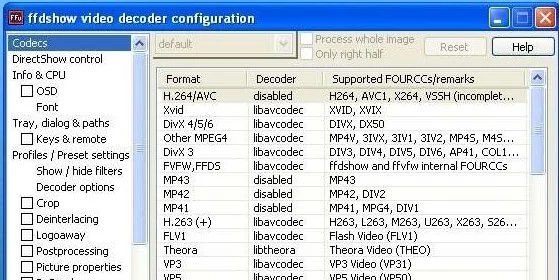
- Configuration Tools: Advanced settings allow users to tweak how their system handles specific containers (like MKV, MP4, or FLV) to prevent conflicts.
A Chronology of Codec Evolution
To understand the relevance of K-Lite, one must look at the history of digital media. In the early 2000s, the internet was a fragmented landscape of proprietary formats. Users had to hunt for individual codecs—often from dubious websites—which frequently led to "codec hell," a state where conflicting software components would cause system-wide crashes.
- The Early 2000s: The rise of P2P file sharing necessitated a "one-stop-shop" for playback. K-Lite emerged as a community-driven project that prioritized stability and ease of installation.
- The Mid-2000s: As high-definition video (HD) became the norm, K-Lite integrated H.264 and AVC support, maintaining its lead over standalone players.
- The 2010s: The introduction of the "Mega" variant consolidated DirectShow filters, ensuring that even obscure file formats used in professional video editing could be rendered in standard Windows environments.
- The 2020s to Present: With the transition to 4K and 8K content, as well as high-efficiency formats like HEVC (H.265) and AV1, K-Lite has continued to update its library to ensure that even the most modern hardware can decode high-bitrate content without stuttering.
Supporting Data: Performance and Compatibility
The K-Lite Mega Codec Pack is not merely a collection of files; it is an integrated ecosystem. According to performance benchmarks, utilizing a properly configured K-Lite environment reduces CPU overhead during video playback by offloading decoding tasks to the GPU (Hardware Acceleration).
Compatibility Matrix:
| Format | Compatibility Level | Supported by K-Lite |
|---|---|---|
| MKV/Matroska | Native (High) | Yes |
| HEVC/H.265 | Native (High) | Yes |
| AV1 | Native (Medium) | Yes |
| Legacy AVI/DivX | Native (Legacy) | Yes |
| FLAC/ALAC Audio | Native (High) | Yes |
The installation process includes a "Codec Tweak Tool," which allows users to reset broken file associations, manage thumbnails, and enable or disable specific filters. This granular control is what separates K-Lite from "all-in-one" players that force their own interface upon the user. By contrast, K-Lite works in the background, enhancing the capabilities of the system’s native Windows Media Player, Media Player Classic, or professional tools like ZoomPlayer and BS.Player.

Official Responses and Developer Perspective
Ralf Buchner, a veteran software analyst at PC-WELT, notes that while the rise of web-based streaming has changed the media landscape, the necessity for local codec packs remains.
"While many users now rely on browser-based platforms like YouTube or Netflix, the demand for local file playback hasn’t vanished," says Buchner. "Professionals, archivists, and users with large local libraries of legacy files still find that Windows’ native support is often insufficient. K-Lite solves this by providing a unified, tested, and secure environment that eliminates the need to download dozens of individual, potentially malicious, codec files from the internet."
The developers of K-Lite have maintained a strict policy of providing "clean" software. In an era where many free downloads are bundled with adware or browser toolbars, the K-Lite project has consistently remained transparent, offering a "no-nonsense" installation process that respects the user’s system integrity.
Implications for the Modern User
Why, in an age of "smart" software, does a codec pack still matter? The implications of installing a package like K-Lite are significant for three primary user demographics:
1. The Media Professional
For those editing video or working with raw footage, the ability to preview files in a standard file explorer or a lightweight media player is crucial. K-Lite ensures that Windows can generate thumbnails for non-standard formats, saving hours of organizational time.
2. The Legacy Content Collector
Many users possess archives of videos from the 1990s and early 2000s encoded with early versions of DivX or Xvid. These formats are often unsupported by modern software players. K-Lite bridges the gap, allowing this content to be viewed on modern Windows 11 hardware without requiring a secondary "retro" machine.
3. The Performance-Conscious User
By utilizing K-Lite, users can leverage hardware-accelerated filters (LAV Filters) that are significantly more efficient than the default Windows decoders. This translates to lower battery consumption on laptops and reduced heat output on desktop systems during long-duration 4K playback.
Addressing Potential Risks
The article acknowledges that codec packs have historically been viewed with caution due to potential system instability. However, K-Lite mitigates this through its "detect and remove" feature. During installation, the software scans for broken or conflicting filters and offers to repair or remove them, ensuring that the system remains stable.
Conclusion: A Tool for the Future
The K-Lite Mega Codec Pack is more than a utility; it is a testament to the longevity of open-standard multimedia. As the world moves toward increasingly complex video compression standards, the ability to quickly and safely update one’s system with the latest decoding logic is invaluable.
For those looking to optimize their multimedia experience, K-Lite remains the gold standard. Whether you are dealing with ultra-high-definition AV1 streams or need to resurrect an old home video, the tools provided in the Mega pack ensure that your media remains accessible, fluid, and high-quality.
Final Recommendation: Users should always download the latest version directly from trusted sources to ensure the inclusion of the most recent security patches and codec updates. If you are struggling with playback, K-Lite’s configuration tools are the first place you should look to restore functionality to your Windows environment.
Disclaimer: As with any system-level software, it is recommended to create a System Restore point before performing a major update to your codec library. For further alternatives, users may explore the X Codec Pack or specialized tools like Xvid for specific compression needs.