
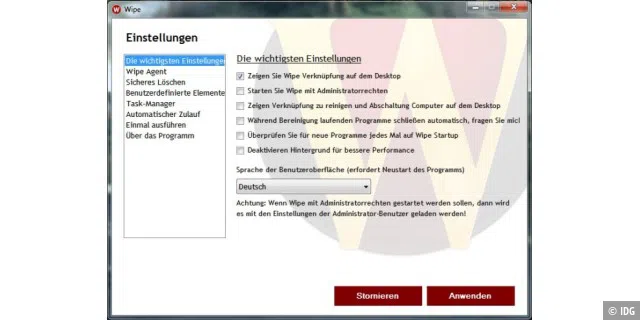
In the modern digital landscape, our computers have become extensions of our professional and personal lives. However, just as a physical workspace requires regular tidying to remain productive, a computer’s operating system demands consistent maintenance to stave off the "digital rot" caused by accumulated junk files, fragmented caches, and lingering privacy traces. One software solution gaining traction for its precision in this domain is "Wipe."
This article explores the utility of the Wipe utility, its role in system optimization, and the broader implications of data hygiene in an era of increasing privacy concerns.
The Silent Performance Killer: Understanding Digital Clutter
Every time a user navigates the internet, installs an application, or creates a document, the operating system generates auxiliary files. Browser caches, temporary cookies, system logs, and "orphan" files from uninstalled programs slowly accumulate on the hard drive.

While these files are intended to speed up repetitive tasks—such as loading a frequently visited website—their long-term build-up creates a significant drag on system performance. Furthermore, these files consume valuable storage space and, more importantly, create a roadmap of user activity. For privacy-conscious individuals, the browser history, session cookies, and temporary data are not just junk; they are sensitive information footprints that, if left unmanaged, could be accessed by unauthorized parties or malicious software.
Wipe: An Overview of the Cleaning Tool
Wipe is a specialized software utility designed to automate the process of clearing these digital cobwebs. Unlike basic disk cleanup tools that might focus solely on temporary system files, Wipe adopts a more aggressive approach to data sanitization.
Core Functionality
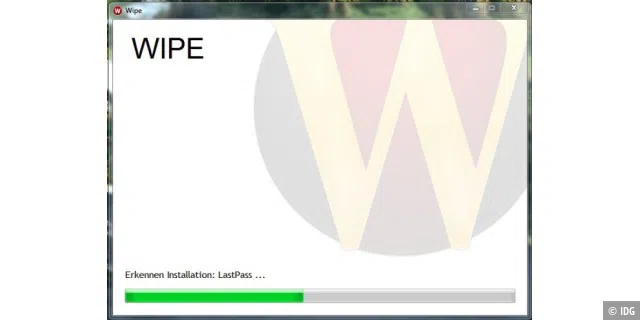
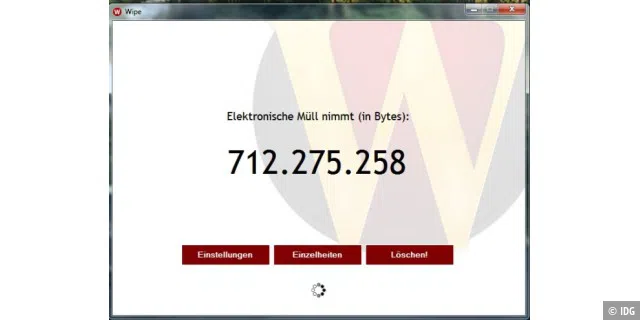
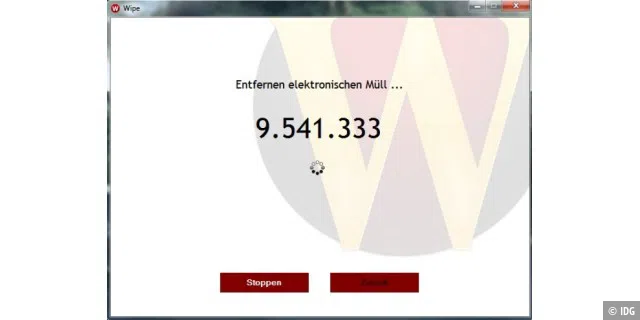
Upon initialization, Wipe performs a comprehensive scan of the system to identify all relevant installed programs. It is designed to recognize hundreds of applications, mapping out exactly where they store their temporary data. Once the scan is complete, the user is presented with a breakdown of junk files, categorized by source.
Data Sanitization and Security
One of the primary differentiators of Wipe is its commitment to data destruction. Simply deleting a file often only removes the "pointer" to that data in the file system, leaving the actual bits intact on the disk until they are overwritten by new data.
Wipe utilizes advanced security methods to ensure that deleted files are truly unrecoverable. By scrubbing unused storage space, it prevents data recovery software from accessing deleted history or temporary files. This is a vital feature for users who share a computer or those who operate in environments where data privacy is paramount.
Chronology of System Maintenance: From Manual Cleanup to Automation
The history of system maintenance tools reflects the evolution of the PC itself.
- The Early Days (1990s – Early 2000s): Users were expected to manually delete files from
C:TEMPor empty the Recycle Bin. System performance was a manual, often tedious, endeavor. - The Rise of Third-Party Utilities (Mid-2000s): As software became more complex, developers realized that standard operating system tools were insufficient. This era saw the birth of utilities like CCleaner and, subsequently, focused tools like Wipe, which offered more granular control.
- The Current Era (2020s): Today’s environment is defined by the tension between user convenience and privacy regulations. Tools like Wipe have evolved to not only "clean" for performance but to "scrub" for GDPR compliance and personal data protection.
Supporting Data: Why "Wipe" Matters
While individual files may seem insignificant, their collective impact is measurable.
- Performance Metrics: Studies on long-term Windows usage indicate that a system cluttered with thousands of temporary files can suffer from longer boot times and slower application launch speeds. By removing these files, users often report a "snappier" user interface.
- Storage Recovery: In the age of high-resolution media and large software suites, every gigabyte counts. Automated tools like Wipe can recover anywhere from several hundred megabytes to several gigabytes of space on a standard machine, effectively deferring the need for a hardware upgrade.
- Privacy Mitigation: A 2023 survey regarding consumer digital hygiene found that over 60% of users are unaware of the amount of data their browser stores locally. Tools like Wipe serve as a "privacy firewall," ensuring that even if a machine is compromised, the "paper trail" of the user’s online history has been sanitized.
Official Perspective and Expert Recommendations
Industry experts and security professionals often advocate for a multi-layered approach to PC maintenance. While Windows includes built-in tools like "Disk Cleanup" or "Storage Sense," these utilities are often conservative.
"The built-in tools are designed to keep the system running, but they aren’t designed to be forensic-grade cleaning tools," notes Ralf Buchner, a veteran software expert at PC-WELT. "For users who want to ensure that their digital footprint is erased, specialized software like Wipe offers a depth of control that standard OS utilities lack. It allows for the selection of specific files to be kept or destroyed, providing a bespoke cleaning experience."

Comparative Analysis: Wipe vs. Competitors
When discussing alternatives, CCleaner is frequently mentioned. While CCleaner offers a broader suite of tools, including registry cleaners and driver updaters, Wipe focuses specifically on the integrity of the cleaning process. Users who prefer a "set it and forget it" approach to privacy often find Wipe’s interface to be more intuitive and less prone to the "feature creep" that has affected other popular utilities.
Implications for the Future of Personal Computing
As we move toward more cloud-integrated operating systems, one might assume that local junk files would become obsolete. However, the opposite is true. The more data we interact with via web browsers, the more temporary data is cached locally to compensate for variable internet speeds.
The Privacy Mandate
Privacy is no longer an optional setting; it is a necessity. As browsers become the "operating system" for most users, the local storage associated with these browsers has become a primary target for forensic analysis. Using a tool like Wipe is a proactive step toward digital autonomy. It empowers the user to dictate exactly what information remains on their hardware.

Balancing Maintenance and Stability
A common concern with aggressive cleaning tools is the risk of deleting "critical" files. Modern versions of Wipe have addressed this by including an "advanced mode" that allows users to white-list specific files or folders. This balance between automation and user control is crucial for maintaining system stability.
Conclusion: Establishing a Routine
The efficacy of a tool like Wipe is ultimately determined by the user’s habits. A single cleaning session is useful, but the true benefit comes from consistency. By incorporating a regular "wipe" into a monthly digital maintenance schedule, users can:
- Maintain Hardware Longevity: By reducing unnecessary read/write operations on SSDs and hard drives.
- Enhance Security: By ensuring that temporary files do not contain sensitive credentials or historical data.
- Optimize Workflow: By ensuring that the operating system remains lean and responsive.
For those looking to streamline their Windows experience, Wipe provides a robust, professional-grade solution. Whether you are a casual surfer or a power user, the benefits of a clean, secure, and optimized machine are undeniable. As the digital world continues to expand, the tools we use to maintain our personal space will remain just as important as the hardware itself.
Disclaimer: As with any software that modifies system files, users are encouraged to back up important data before performing a full-system cleanup. For those interested in broader Windows tuning, check out our comprehensive guide to the latest system optimization tools.