
In an era where digital information is the lifeblood of both personal productivity and corporate operations, the catastrophic loss of data—whether through hardware failure, ransomware attacks, or accidental deletion—remains an existential threat. For Windows users, finding a robust, reliable, and user-friendly solution to mitigate these risks is paramount. AOMEI Backupper, a staple in the Windows utility ecosystem, has long been a go-to tool for users seeking to bridge the gap between complex enterprise solutions and basic, unreliable built-in recovery tools.
This article examines the capabilities of AOMEI Backupper, its role in modern data hygiene, and how it stacks up against the broader market of backup solutions.
Main Facts: What is AOMEI Backupper?
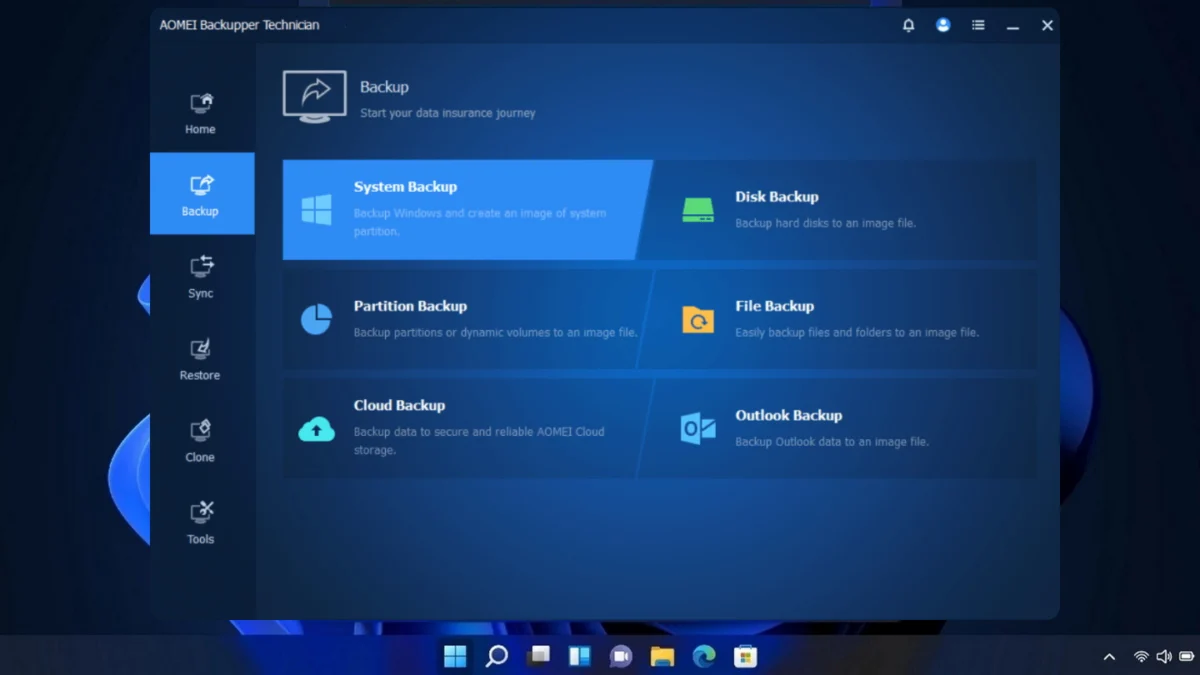
AOMEI Backupper is a comprehensive data protection and disaster recovery software suite designed primarily for the Windows environment. At its core, it addresses the fundamental requirement of any backup strategy: ensuring that a functional copy of your operating system, partitions, and critical files exists independently of your primary storage media.
Key Functional Pillars
- System and Data Backup: The software allows users to create full images of their OS, individual partitions, or specific file structures. Crucially, these backups are performed via VSS (Volume Shadow Copy Service), meaning users can continue working without closing applications while the backup process runs in the background.
- Disk and Partition Cloning: For users migrating to new hardware—such as upgrading from an aging HDD to a high-speed NVMe SSD—AOMEI provides sector-level cloning. This allows for a seamless transition without the need to reinstall Windows or reconfigure software.
- Intelligent Syncing: Beyond static images, the software facilitates real-time synchronization. This ensures that designated folders remain mirrored on secondary drives, NAS devices, or cloud-based storage providers like Google Drive, Dropbox, and OneDrive.
- Scheduling and Automation: Manual backups are rarely consistent. AOMEI’s scheduling engine allows for automated, incremental, and differential backups, ensuring that the "latest" version of data is always protected without manual intervention.
Chronology: The Evolution of Backup Standards
The necessity for third-party backup software like AOMEI Backupper is rooted in the history of Windows’ own recovery limitations.
- The Early Days (Windows XP/7): Early versions of Windows lacked robust, intuitive imaging tools. Users were forced to rely on complex command-line utilities or expensive enterprise-grade software.
- The Rise of Consumer Software (2010–2015): As solid-state drives (SSDs) began to drop in price, the need for "cloning" software surged. AOMEI emerged during this period, positioning itself as a "freemium" alternative that provided high-end features—previously reserved for IT departments—to the average home user.
- The Ransomware Era (2017–Present): With the proliferation of cryptolockers, the focus shifted from "drive failure recovery" to "immutable backups." Modern iterations of AOMEI have integrated features designed to protect backups from being encrypted by malicious actors, reinforcing the necessity of offline or cloud-syncing capabilities.
Supporting Data: Why Backup Software is Essential
The industry standard for data protection is often cited as the 3-2-1 Rule: keep three copies of your data, on two different media types, with one copy stored off-site.
According to various industry studies:

- Hardware Failure: Nearly 20% of hard drives fail within the first four years of operation. Relying on a single drive is a statistical gamble that most users eventually lose.
- User Error: Accidental deletion remains the leading cause of data loss in professional environments, accounting for approximately 30-40% of all recovery requests.
- Cyber Threats: Ransomware attacks have increased by over 150% in the last three years. A simple "copy-paste" backup is often insufficient, as the ransomware can traverse network shares to infect backups. Tools like AOMEI, which support external and encrypted cloud targets, are essential for maintaining an "air-gapped" recovery point.
The Versioning Dilemma: Standard vs. Professional
A common point of confusion for new users is the distinction between the Standard (Free) and Professional versions.
The Standard Edition
The Standard version is highly capable and sufficient for the average home user. It covers essential imaging, file synchronization, and basic cloning tasks. It is arguably the most generous free utility in its class, as it does not aggressively throttle the speed of backups or limit the size of the data being processed.
The Professional and Workstation Editions
For power users and businesses, the Professional and Workstation tiers (priced at €39.99 and €49.99 respectively) unlock advanced features, including:
- Universal Restore: Essential for moving a system image to a computer with different hardware (e.g., swapping a motherboard or changing CPU architectures).
- Command Line Utilities: Allows sysadmins to script backups for automated deployment across multiple machines.
- Real-time File Sync: Providing immediate, continuous protection rather than scheduled intervals.
- Enhanced Encryption: Offering higher levels of security for sensitive enterprise data.
Official Perspective and Implementation
AOMEI’s design philosophy centers on "low friction." In the competitive software market, their primary goal is to ensure that a user who has never performed a backup can navigate the interface and secure their data within five minutes.
When configuring AOMEI, experts recommend the following workflow for maximum security:
- Baseline Image: Perform a full system image immediately after a fresh Windows install.
- Incremental Rotation: Set up a weekly incremental backup to save storage space while maintaining a "change history."
- Verification: Periodically use the "Check Image" function. A backup that cannot be restored is effectively useless; verifying the integrity of the archive is a step too many users overlook.
Alternatives in the Market
While AOMEI Backupper is a leader in user-friendliness, it is not the only player in the field. Users with specific needs may look toward alternatives:
- Personal Backup: A robust, open-source tool that excels at simple file-based backups to local or network servers. It is highly configurable but lacks the intuitive "one-click" imaging interface of AOMEI.
- Iperius Backup: A versatile tool often favored in professional environments for its ability to handle virtual machines (VMware/Hyper-V) and databases, alongside standard file backups.
- Veeam Agent for Windows: Often considered the "gold standard" for power users and IT professionals. While more complex to set up, it offers unparalleled reliability for Windows recovery.
Implications: The Future of Data Hygiene
The transition toward cloud-centric workflows has changed the nature of "backing up." With OneDrive, Dropbox, and Google Drive, many users mistakenly believe their data is "safe." However, cloud synchronization is not a backup—it is a mirror. If a file is deleted or encrypted by ransomware on your local machine, that action is immediately synced to the cloud, effectively deleting your "backup" as well.
Software like AOMEI Backupper remains critical because it creates point-in-time snapshots. These snapshots serve as an insurance policy against the fallibility of cloud syncing and the unpredictability of hardware.
Conclusion
Data protection is not a "set it and forget it" task; it is an ongoing process of maintenance and verification. AOMEI Backupper provides a low-barrier-to-entry solution that enables both novices and power users to adhere to the 3-2-1 backup principle. By leveraging its cloning, imaging, and synchronization features, users can ensure that their digital footprint remains intact, regardless of the physical or cyber-threats that may arise.
As digital threats evolve, the tools we use must also adapt. Whether you choose the Standard version for basic protection or opt for the Professional tier for advanced recovery scenarios, the most important step is to begin the backup process today. Your future self—having avoided the catastrophic loss of photos, documents, and system stability—will thank you.